Read the video transcript
- Contacts Saver. Whole groups into one spreadsheet.
- Sign in at WhatsApp Web first. The panel should say Connected to WhatsApp Web.
- Type part of a group name and the list narrows. Tick the ones you want — the bar below keeps count.
- It's on by default, and every group they belong to still gets listed.
- Hit EXPORT and let it work. Stop early, keep what it found.
- A real Excel workbook, not a renamed CSV.
- Contacts Saver. Free on the Chrome Web Store.
WhatsApp has no button to save a group's member list. To export WhatsApp group contacts to Excel, you either copy numbers one by one or let a tool do it. This guide uses Contacts Saver, a free Chrome and Edge extension that works inside WhatsApp Web.
Why Excel? A spreadsheet is easy to sort, filter, share and import into a CRM. It works for one group or hundreds at once.
What you need
- A computer with Google Chrome or Microsoft Edge
- WhatsApp or WhatsApp Business, logged in at web.whatsapp.com
- The free Contacts Saver extension
- Membership of the groups (no admin rights needed)
Step-by-step instructions
- 1
Install Contacts Saver and pin it
Add Contacts Saver to Chrome or Edge from the Chrome Web Store. It's free to install.
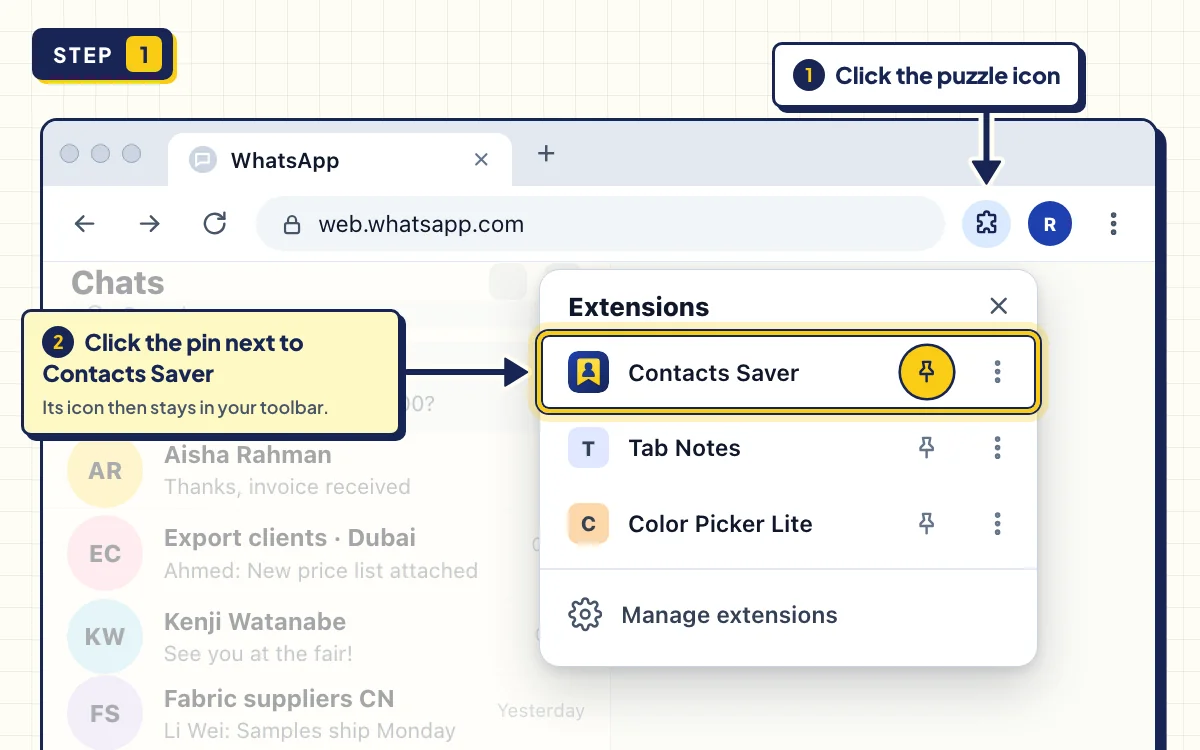
Click the puzzle-piece icon in your toolbar and pin Contacts Saver, so it's always one click away.
- 2
Open WhatsApp Web and wait for your chats
Go to web.whatsapp.com, log in as usual and wait until your chats have loaded.
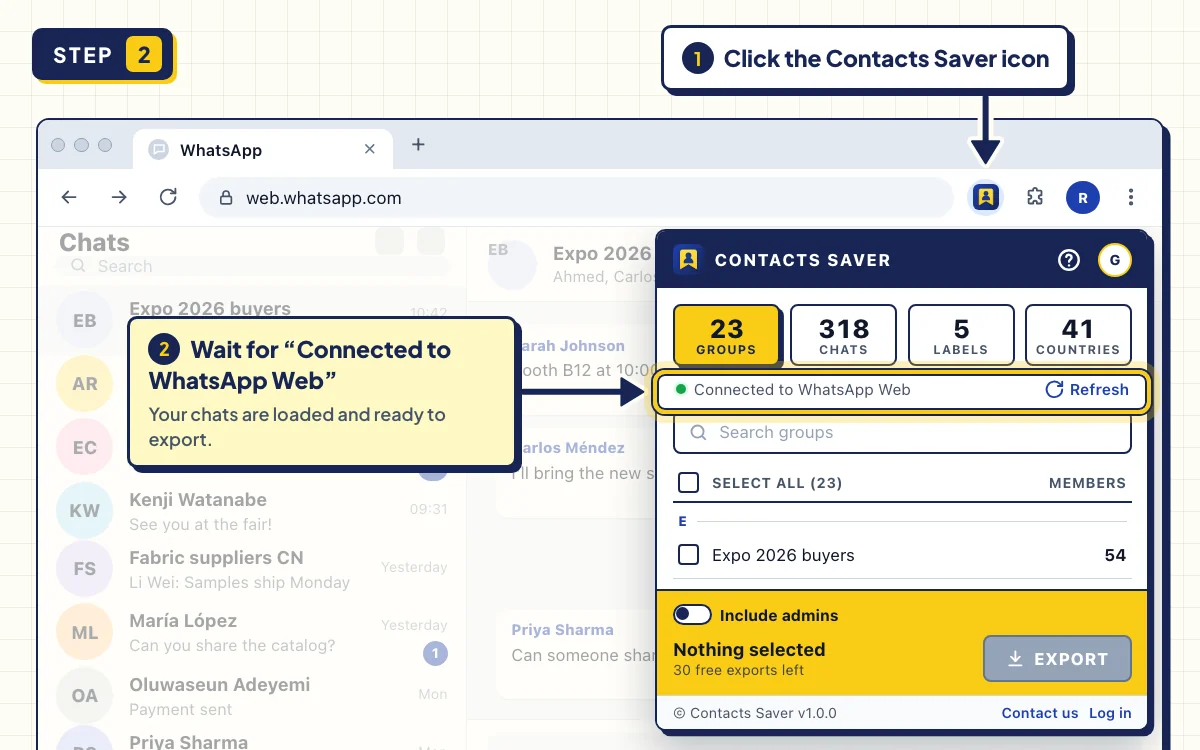
Click the Contacts Saver icon. The popup should say Connected to WhatsApp Web. If it says WhatsApp is still syncing, wait a moment and click Refresh.
- 3
Tick the groups you want
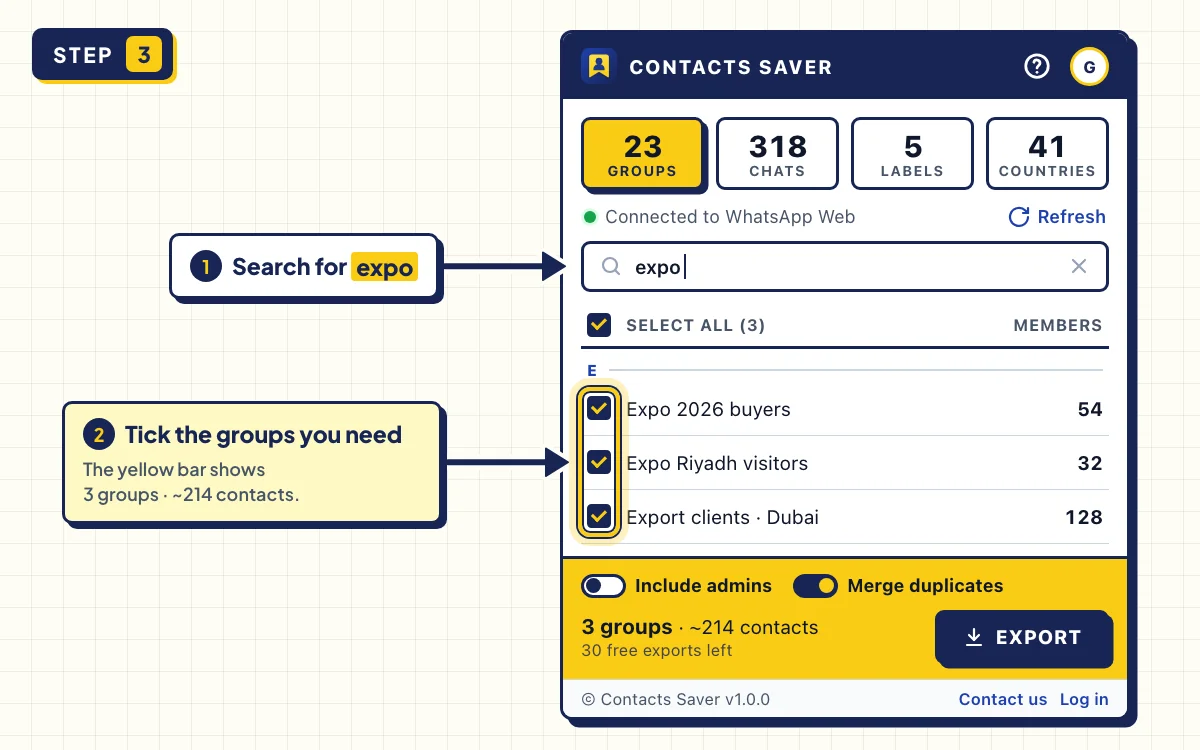
Stay on the GROUPS tab. Each group shows its member count. A dash means the count isn't loaded yet, but the export still works.
Type part of a name in Search groups, for example "expo". SELECT ALL then ticks only the groups that match your search.
- 4
Set the two switches
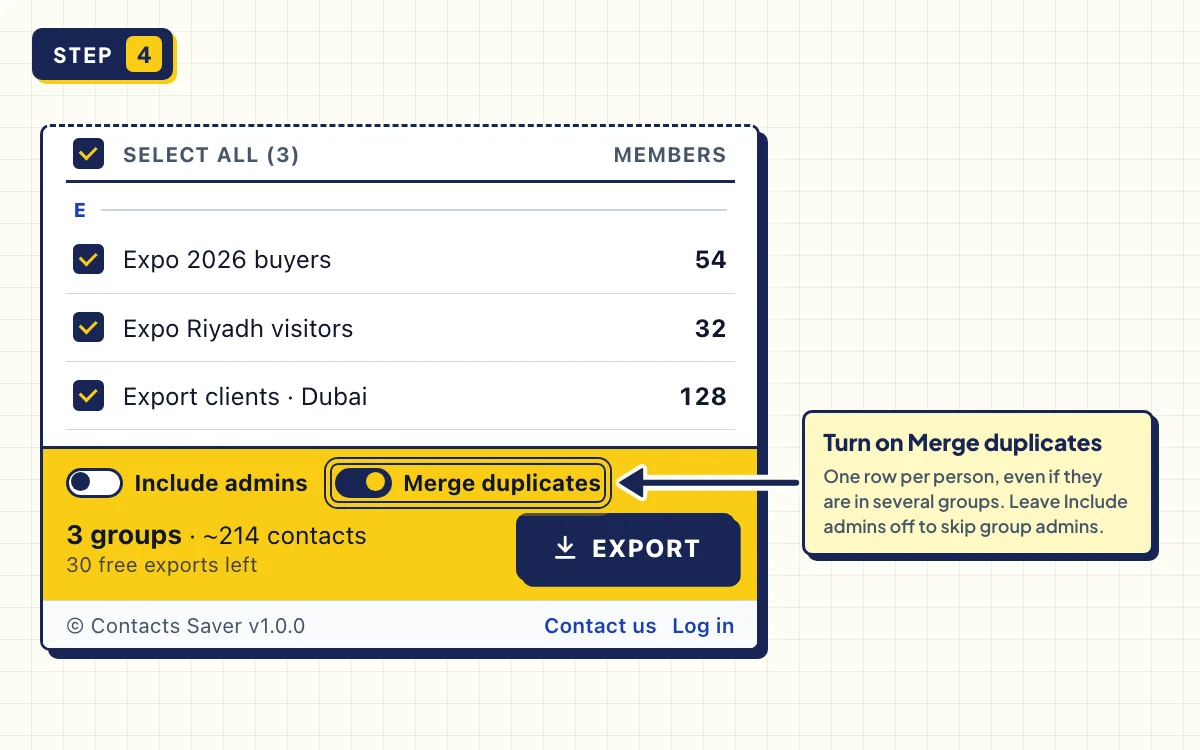
Include admins is off by default, so group admins are left out. Turn it on if you want them in the file.
Merge duplicates appears when you tick two or more groups and is on by default. Each person gets one row, with every group they're in listed under Group Name.
- 5
Click EXPORT and download XLSX
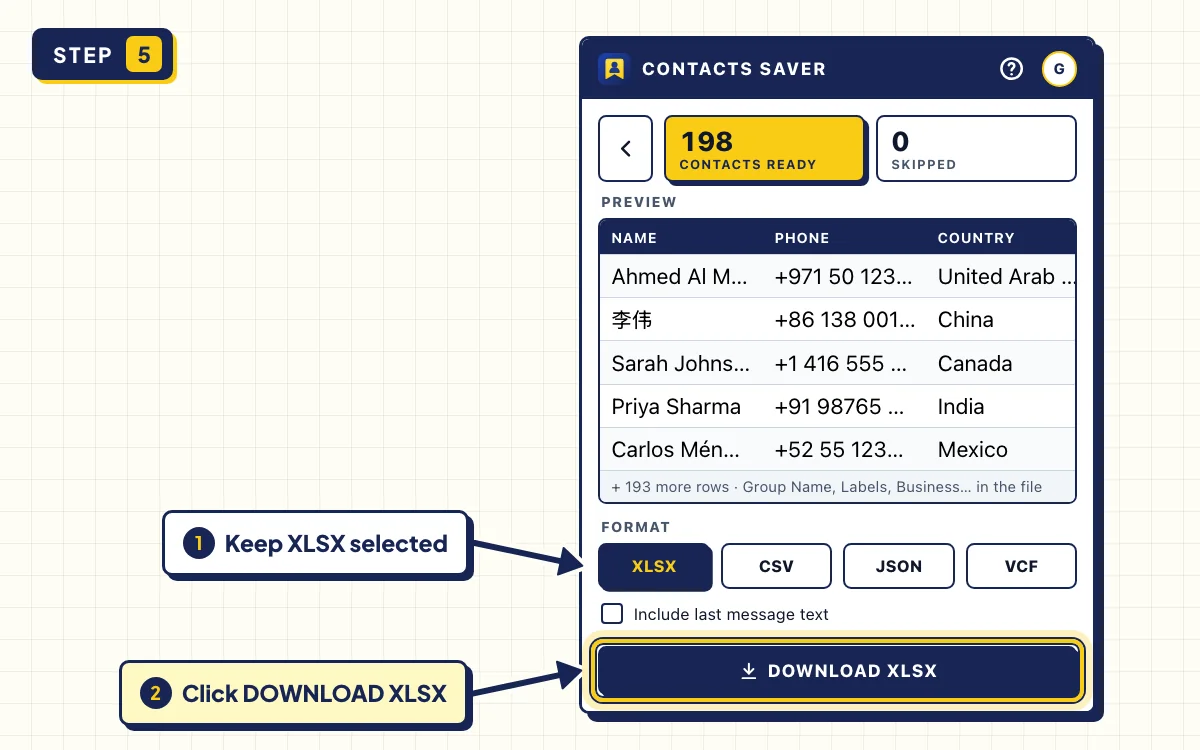
Click EXPORT. Contacts Saver reads the members and resolves their numbers. You can click STOP at any time and keep everything collected so far.
When you see CONTACTS READY, pick XLSX under FORMAT and click DOWNLOAD XLSX. Your browser saves the file like any other download.
- 6
Open the file in Excel
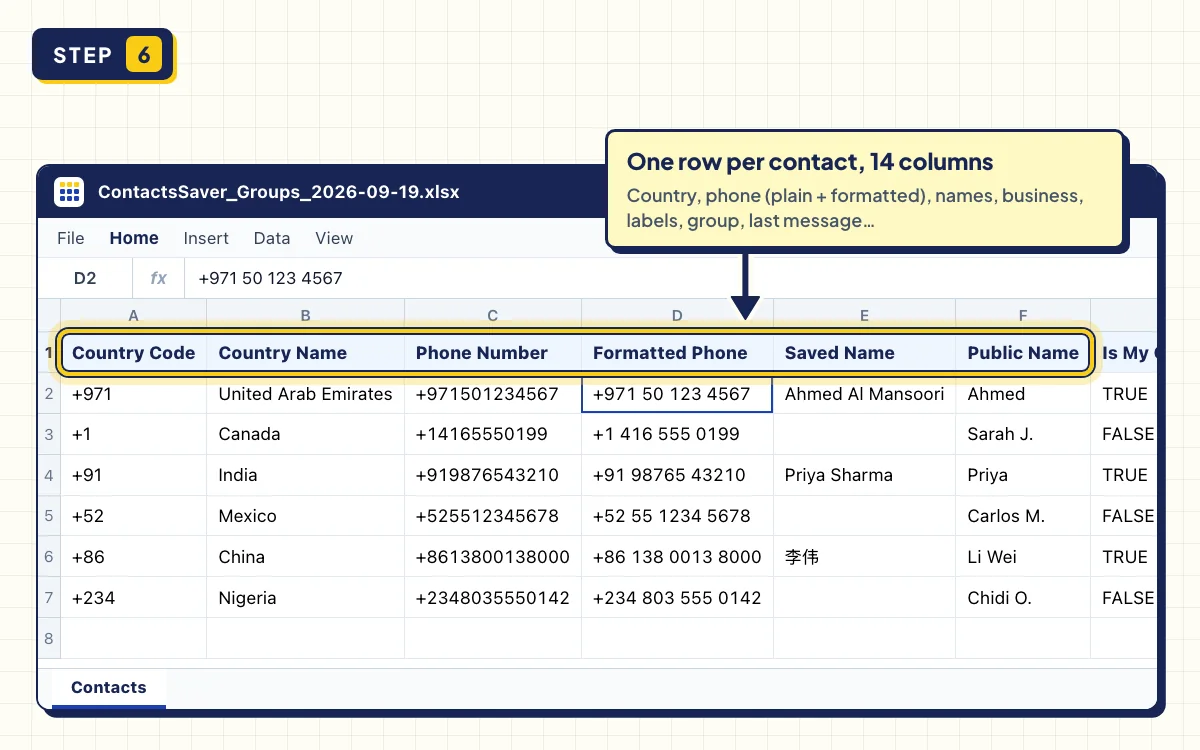
The file is called something like ContactsSaver_Groups_2026-09-19.xlsx. It's a real Excel workbook, not a renamed CSV, so it opens straight away.
The table below explains each column.
What each column means
| Column | What it shows |
|---|---|
| Country Code, Country Name | Like +91 and India. +1 and +7 are split by area code. |
| Phone Number, Formatted Phone | The number with a plus sign, like +12125550147, and as WhatsApp shows it. |
| Saved Name | The name in your phone. Empty if you haven't saved the number. |
| Public Name | The name the person set in their WhatsApp profile. |
| Is My Contact, Is Business, Is Blocked | TRUE or FALSE for each. |
| Group Name | The group, or every group the person is in when Merge duplicates is on. |
| Last Msg Date, Type, Status | When you last chatted, who wrote last, and whether it's unread. |
Troubleshooting
Some members are counted as SKIPPED
WhatsApp hides some members' numbers, for example in large communities or because of privacy settings. Contacts Saver counts them under SKIPPED instead of adding broken rows.
The popup says "WhatsApp is still syncing"
WhatsApp Web loads your chats in the background. Wait a moment, then click Refresh. If a group is still missing, open it once and click Refresh again.
A big group takes a long time
Very large groups take a while. Keep the popup open until it finishes. If you click STOP, you still get every contact collected so far.
Tips
- Build one lead list from many groups: search a shared word like "buyers", click SELECT ALL and leave Merge duplicates on.
- Need one country only? Filter the Country Name column, or see how to export WhatsApp contacts by country.
- Want the members on your phone? Pick VCF instead and follow the vCard guide.
Can you export WhatsApp group contacts to Excel without an extension?
Yes, but it's slow. You can copy each number from the group info, or copy the member line with Inspect Element and clean it up in Excel. Saved contacts then show up as names, not numbers, and countries and duplicates are up to you. We compare four methods in How to Extract Phone Numbers From a WhatsApp Group.
Export your first WhatsApp group now
Contacts Saver is free to install and includes 30 full exports in every format. Works in Chrome and Edge.
Frequently asked questions
Can I export contacts from a WhatsApp group if I'm not an admin?
Yes. Any member can see a group's participants in WhatsApp Web, so any member can export them. The file only includes people you can already see.
How do I copy the list of members in a WhatsApp group?
WhatsApp only lets you copy numbers one at a time. To copy the whole list, export the group with Contacts Saver, open the file and copy the Phone Number column.
Can I export several groups without duplicates?
Yes. Tick the groups and leave Merge duplicates on. Each person appears once, and the Group Name column lists all their groups.