Read the video transcript
- Group members you never saved? Add them all.
- One group is enough to start. EXPORT gives you the count, plus anything it had to skip.
- That's the vCard format — one file, every member inside.
- Send the file to your phone and open it. Android imports it straight into Contacts. On iPhone, go through iCloud.
- Contacts Saver. Free on the Chrome Web Store.
First, a quick check. WhatsApp shows the names from your phone's contacts, so everyone you already saved is on your phone. This guide shows how to save WhatsApp contacts to your phone that you haven't saved yet, such as group members or new customers.
Saving 200 group members one by one is slow and easy to get wrong. With a vCard (.vcf) file, you add them all at once: export the file on your computer, then import it on Android or iPhone.
If contacts you saved don't appear in WhatsApp at all, that's a sync problem, not an export problem. See the "Contacts not syncing?" box below.
What you need
- A computer with Chrome or Edge, with WhatsApp Web logged in
- The free Contacts Saver extension
- Your Android phone or iPhone
- On iPhone: iCloud Contacts turned on
Step-by-step instructions
- 1
Export the group as a vCard
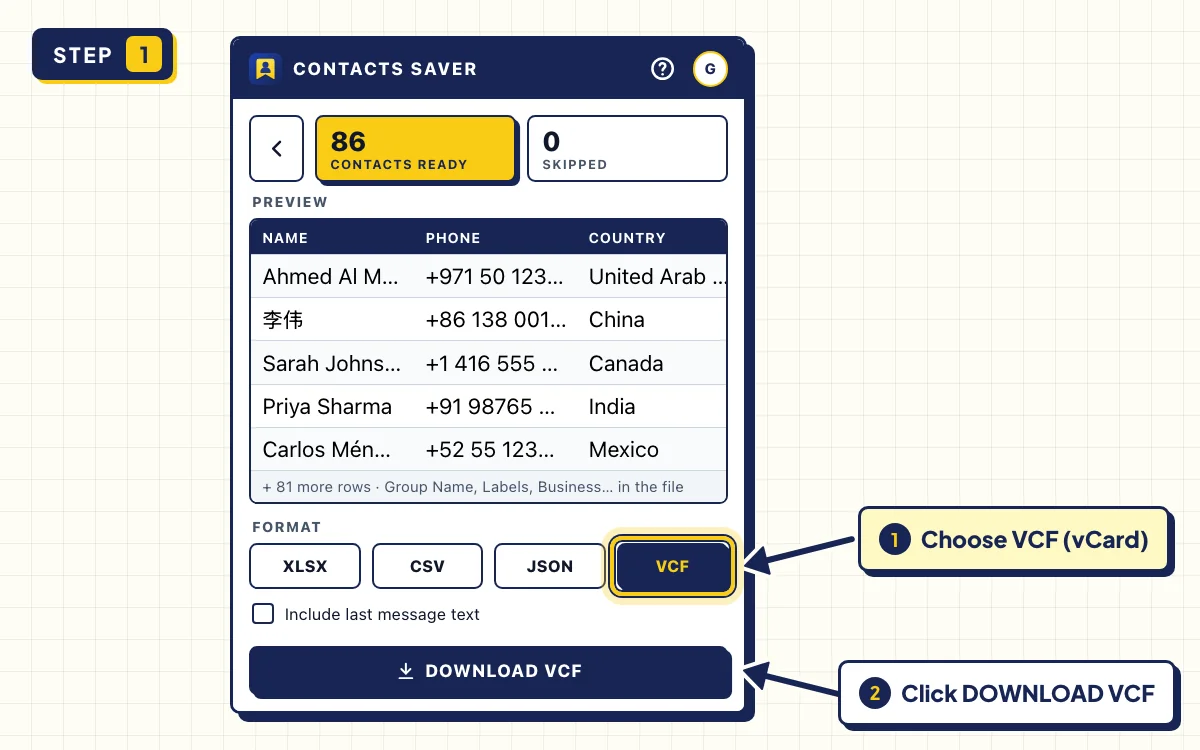
Open WhatsApp Web and click the Contacts Saver icon. On the GROUPS tab, tick the group you want to save and click EXPORT.
When you see CONTACTS READY, choose VCF under FORMAT and click DOWNLOAD VCF. You get one .vcf file with every member inside.
- 2
On Android, import the file into Contacts
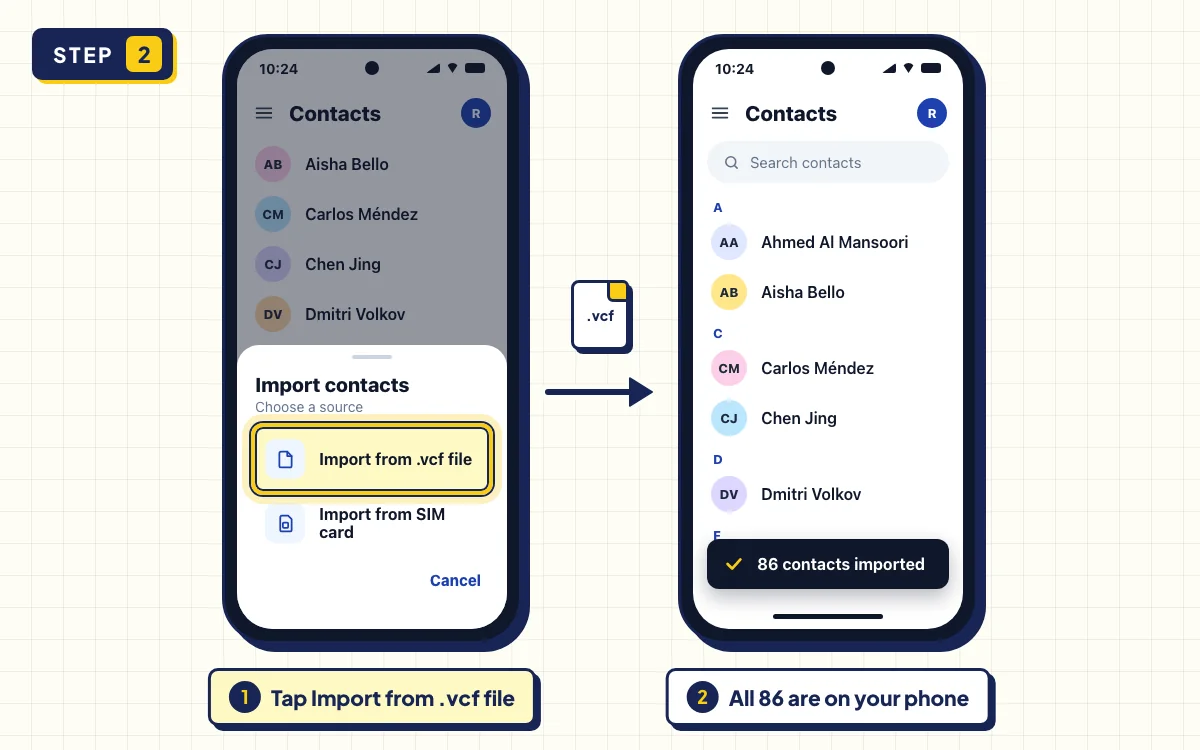
Copy the .vcf file to your phone, for example by email or USB cable. Open the Contacts app, tap Organize, then Import from file, and pick the file. If you have more than one account, choose your Google account. Menu names can differ a little between phone brands.
No file on the phone? Import it on your computer at contacts.google.com: click Import, select the file and click Import again. The contacts then sync to every Android phone signed in to that Google account. Google explains it in Import your contacts into Google Contacts.
- 3
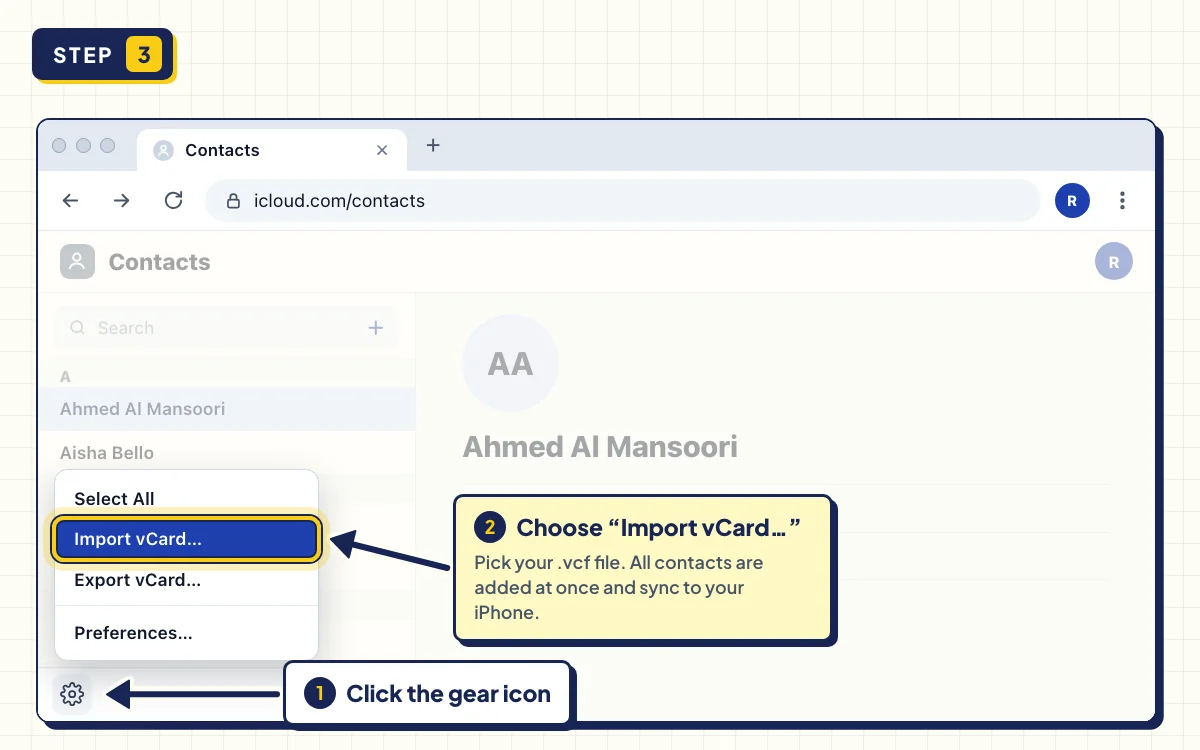
On iPhone, import the vCard at iCloud.com
On your computer, go to icloud.com/contacts and sign in with your Apple Account. Click the + button, choose Import Contact and select the .vcf file. On older versions of the page, it's the gear icon and Import vCard.
Each person in the file becomes a separate contact. If iCloud Contacts is on for your iPhone, they sync to it automatically. See Apple's guide: Import, export, or print contacts on iCloud.com.
- 4
Check the new names in WhatsApp
Open WhatsApp on your phone. The people you imported now show with names instead of bare numbers.
On Android, if a name is still missing, tap the new chat icon, then More options (⋮) and Refresh.
Tips to save WhatsApp contacts to your phone
Which name goes on each contact
For people you already saved, the vCard uses your saved name. For everyone else, it uses the public name they set in WhatsApp, or the number if they have none. The group name goes into the contact's notes, so later you can see where you met.
Avoid duplicates on your phone
If some members are already in your phone, the import can create a second copy. In Google Contacts, open Merge & fix after the import to combine them. When you export several groups, leave Merge duplicates on, so each person is in the file only once.
Very long lists
Google Contacts imports up to 3,000 contacts at a time. For a bigger list, export fewer groups per file.
Troubleshooting the export
- Some members are SKIPPED. WhatsApp hides some members' numbers, for example in large communities or because of privacy settings. Contacts Saver counts them instead of saving broken contacts.
- The popup says WhatsApp is still syncing. Wait for your chats to load, then click Refresh.
- A large group takes a while. Keep the popup open. If you click STOP, you keep every contact collected so far.
- VCF shows a lock. Your 30 free full exports are used up, and vCard needs VIP after that. XLSX, CSV and JSON still download the first 10 rows.
Save a whole group to your phone
Install Contacts Saver for free. Your first 30 exports include vCard.
Frequently asked questions
How do I move my WhatsApp contacts to my phone?
People you chat with are usually on your phone already, because WhatsApp uses your phone's address book. For numbers you haven't saved, like group members, export a vCard with Contacts Saver and import it on your phone.
How can I automatically save WhatsApp contacts to my phone?
WhatsApp doesn't save unknown numbers automatically. The fastest way is in bulk: export the group as one vCard file and import it once. People who join later need a new export.
Is there an Android or iPhone app for this?
No. Contacts Saver is a desktop extension for Chrome and Edge. You export on your computer, then import the vCard on your phone. Be careful with APK files from unknown sites that promise to save WhatsApp contacts.